 Arrow Escape
How to Play Arrow Escape
Arrow Escape is a free browser puzzle about finding the right removal order. You do not turn the arrows or draw a route: each arrow already has a direction. Your job is to decide which one can leave now.
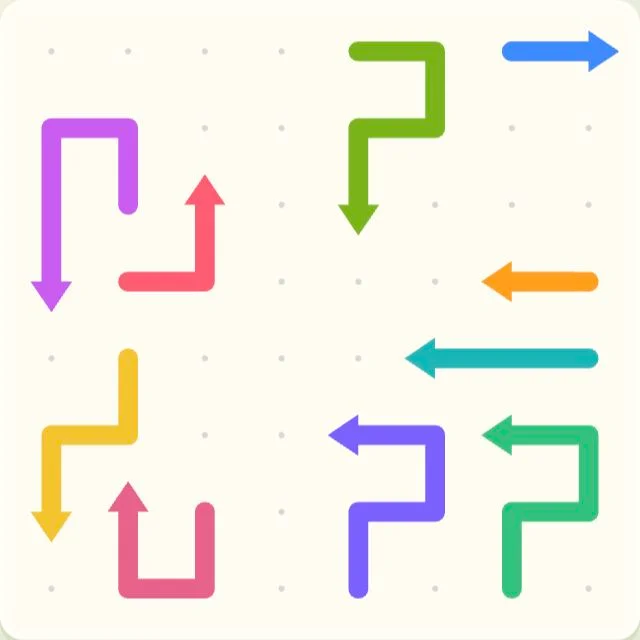
Read the arrowhead, then tap
Click with a mouse or tap on a touchscreen. Look at the pointed end, then trace a straight line outward in that direction. If another arrow occupies that line, the move is blocked. The entire selected arrow slides out along its body when the exit is clear.
Try this on level 1
Open the level picker and choose 1. The blue arrow at the top right can leave immediately. The downward purple arrow at the far left is blocked by the yellow arrow beneath it. Remove yellow first, then purple. Arrow length alone does not tell you whether a move is safe.
Lives, retries and stars
A blocked move bounces back and costs one life in normal levels. Starting lives depend on the number of arrows: 3 plus one per 15 arrows, capped at 5. Keeping every life earns 3 stars; keeping at least 60% earns 2; otherwise a completed level earns 1. Time is recorded separately. At zero lives, retry the level or choose another one.
Hints and progress
The lightbulb briefly highlights an arrow that can leave. Restart resets the current attempt. Progress, best results and sound settings save in this browser; changing language uses the same save. Clearing browser data can remove it, and saves do not automatically move between devices.
The 5-minute challenge
Choose the challenge button on the start screen. You have five minutes to remove as many arrows as you can across fixed boards. A blocked move subtracts 10 seconds instead of costing a life. Clearing a board loads the next one while the countdown continues.
Share a result, then try another level
After a level or challenge, copy your result with the share button. Friends can use the same level to compare stars, time and best combo. There are 300 main levels and 50 fixed challenge boards; no account or download is needed.